
- Published on
Agentic Studio: Keep a Memory of What You Learn
- Authors

- Name
- Matthew Lam
A hot tip for anyone building agents in Sitecore's Agentic Studio.
Agentic Studio is a good product and I am enjoying working in it. It is also very fresh off the press, and that has consequences you feel daily rather than occasionally:
- Not everything works right immediately.
- Things change, sometimes between one week and the next.
- The official documentation is good, but it sometimes lags a little behind the product.
- And every so often you get a tip from a Sitecore rep that is genuinely useful and exists nowhere in writing at all.
Put those together and you are generating a steady stream of knowledge that has nowhere to live. You work something out on a Tuesday, and by the following month you are working it out again.
The tip
Scope a single Cowork space to Agentic Studio, and do all your agent and workflow work inside it. Nothing else. Not your client project, not your general Sitecore work. One space, one subject.
Then give that space a memory, so it captures your findings, your mistakes and your learnings as you go rather than after the fact.
What I use, and what you could use instead
I run my own Legal Framework in that space, with the implementation I wrote up in the last post. Constitution for the values and the supreme laws, Legislation per area, Common Law for the accumulated facts.
That part is not the point though. Claude Code's out-of-the-box memory would work. Hindsight would work, and probably better than either. Rolling your own would work.
The point is the scoping and the discipline, not the implementation. A memory that covers everything you have ever done is much less useful than one that only knows about Agentic Studio and knows it properly.
Wire in the documentation
Connect the Sitecore Documentation MCP to the space. You do not need to hunt for a URL — Sitecore hands it to you from the docs site itself.
Go to doc.sitecore.com, click Ask AI in the header to open the Documentation Assistant, then open the MCP dropdown at the top of that panel:
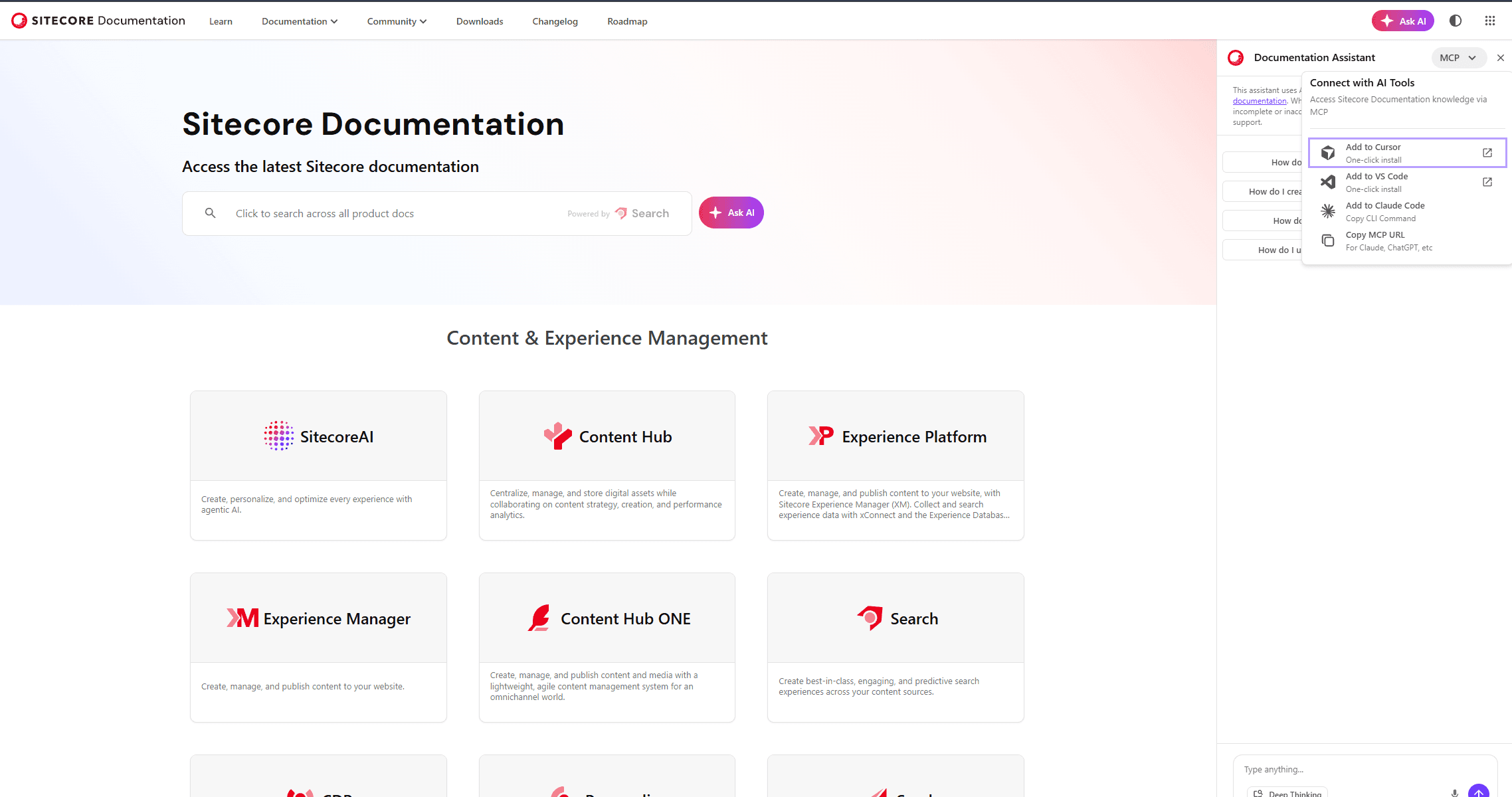
You get one-click installs for Cursor and VS Code, a CLI command for Claude Code, and a plain Copy MCP URL for everything else. That last one is what you want for a Cowork space.
The assistant itself is worth knowing about even without the MCP. Same button, and it is trained on the whole documentation set.
Then write the rule into your constitution. Mine says, roughly: before stating any fact about platform behaviour, query the documentation. Training data is not a source. And every claim carries two labels — where it came from, and what it was checked against.
I use four provenance tiers:
| Tier | Meaning |
|---|---|
observed | I ran it in the platform and saw the result |
documented | It is in the Sitecore documentation, untested by me |
contractual | An authoritative vendor statement that lives outside the docs, such as licensing terms or a support-channel answer. Name who said it and when. |
unverified | Inference. No backing. |
documented never gets quietly promoted to observed. The docs tell you what Sitecore says the product does. Only a run tells you what it does. Where the two disagree, that gap is itself a finding worth keeping.
That contractual tier exists specifically for the rep conversations. A workaround a Sitecore engineer recommends is authoritative about what the vendor will stand behind, and it will never appear in the documentation. Recording it with a name and a date is the difference between institutional knowledge and a rumour.
What you get back
Three things, and the third surprised me.
Findings stop evaporating. This week the space caught that a test I ran in July and an export I took in August flatly disagree about which fields survive. I would not have spotted that from memory, because the July result was three weeks and about forty other problems ago.
Blogging gets much easier. The three Agentic Studio posts I published today — the debug pane, agent exports and widgets — all came straight out of that space. The research was already done, dated and sourced, because it was done as the work happened rather than reconstructed for the post.
Support tickets get better. This is the one I did not expect. When something is wrong, I already have reproduction steps, the exact doc page the behaviour contradicts, what I have already excluded, and the date I checked. That is a far better ticket than "the agent hangs sometimes", and you get a far better answer back.
Worth the setup
Emerging products are the case where this pays off most, because the ground moves and nobody has written the book yet. You are not documenting a stable thing. You are keeping track of a thing that is changing while you use it.
Set the space up once, work in it exclusively, and let it accumulate. Hope this helps.